The simplest way to get booked
Share one link. Clients pick a time from your live availability. Confirmations go out on their own. No email thread, no double booking.
- Every feature included
- No booking limit
- Works in 11 languages
How it works
Three steps to a booking page that works without you
Set it up once. Take bookings around the clock, with no email exchanged.
-
Create your event types
Define what you offer: duration, location, custom questions, and the hours you are actually available.
-
Share your booking link
You get a public profile at /yourname. Put it in an email signature, a bio, your site, or embed it.
-
Clients book. You get notified.
Bookings land in your dashboard and on your calendar. Confirmations, reschedules, and cancellations handle themselves.
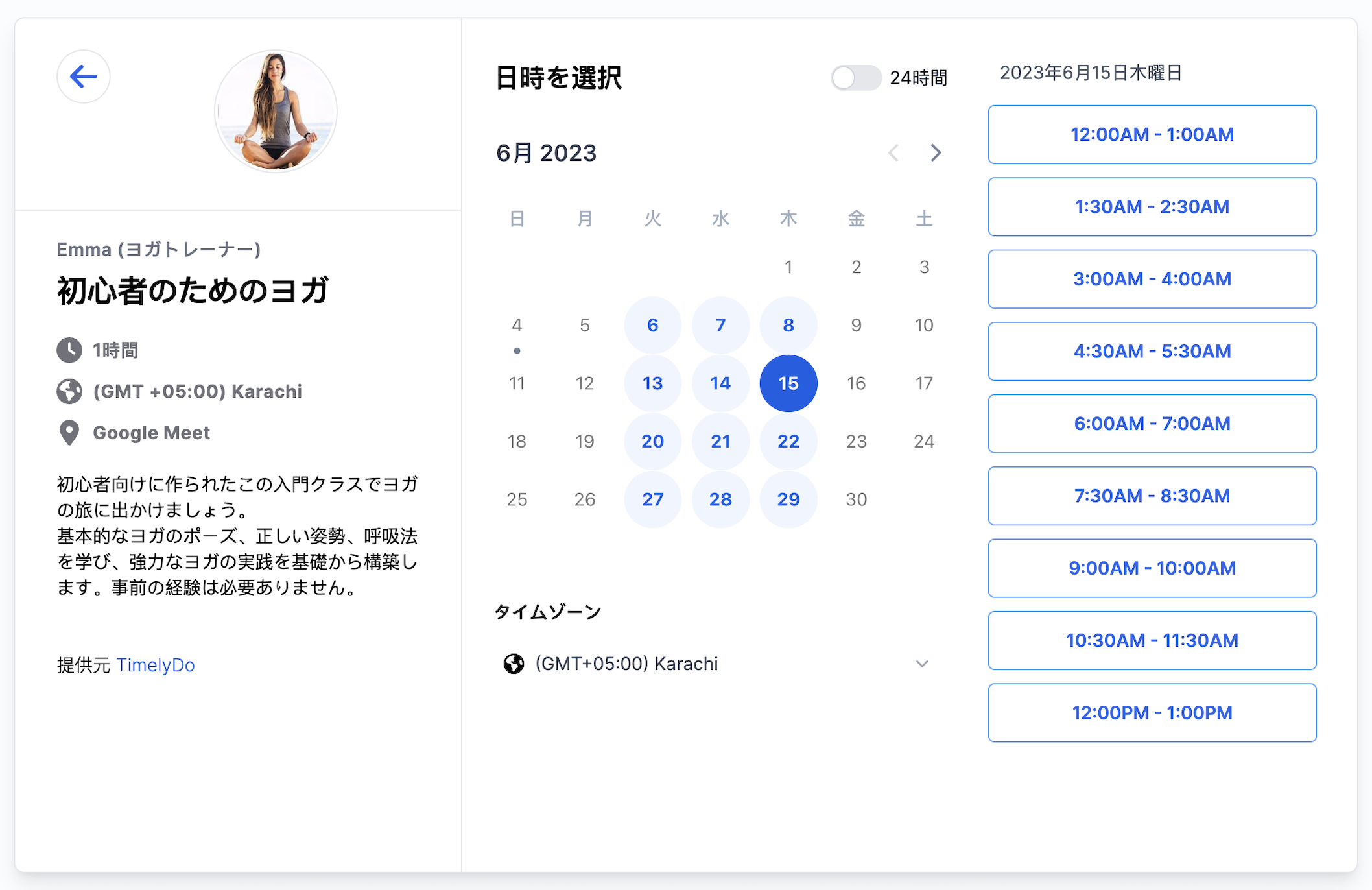
What your clients see
Booked in three taps, from any device
Your visitor picks a day, picks a time, and confirms. They never create an account. You get the booking, the calendar entry, and the notification.
- Only shows times you are genuinely free
- Every time shown in the visitor timezone
- Works the same on phone, tablet, and desktop
Available times
What you get
Everything your scheduling workflow needs
Four parts, each doing one job properly.
Built for
However you get booked
Works with your stack
Connects to the tools you already run on

Need something else? There are webhooks and an API key on every account. See the integrations
Two factor authentication
Add a second step at sign in from your security settings. Any authenticator app works, and backup codes get you in if you lose your phone.
Your data is not for sale
We never sell personal data to third parties. It is used to run the service and nothing else.
GDPR compliant
Lawful processing, full rights over your data, and access or deletion requests honoured promptly.
Nothing is locked in
Disconnect a calendar whenever you want, or ask us to delete your account and everything in it.
Read the full privacy policy and terms.
Free. Forever.
Every feature, no booking limit, no card. Timelydo is free for individuals. We plan to charge organisations, and that plan is not out yet.
Get started freeTeam and organisation plans are coming later.
What is included
- 複数のカレンダーを連携する
- 無制限のイベントを作成する
- 無制限のアクティブなイベント
- メールで会議の通知を受け取る
- 招待者は場所を選択できる
- Timelydo をウェブサイトに追加する
- 予約ページをカスタマイズする
お探しの情報が見つからない場合は、サポートチームにメールでお問い合わせください。ご連絡いたします。
もし私がTimelydo を使用している場合、私のオーディエンスはどのようにミーティングをスケジュールできますか?
Timelydo を使用すると、オーディエンスと共有できる予約ページを作成して設定することができます。オーディエンスは予約ページを介して予定を組み、情報を入力するフォームを記入することができます。
アカウントを削除し、個人データを削除することはできますか?
はい、組織の削除をリクエストするためにお問い合わせいただくことができます。さらに、予約データはX日間のローリングスケジュールで削除されるように予定できます。
特定のメンバーやミーティングタイプにリンクすることは可能ですか?
はい、Timelydo では個別のミーティングタイプや予約ページへの直接リンクを提供しています。
誰かが私たちとミーティングを予約した場合、どうなりますか?
予約が行われると、Timelydo Meetings ダッシュボードとメールカレンダーに新しいイベントが生成されます。予約データが含まれたメール確認と参加者へのミーティング詳細を記載したメール通知を受け取ります。参加者のメールアドレスが対応している場合、自動生成されたメールカレンダーイベントも送信されます。
Timelydo は私の週間スケジュールの変更に対応できますか?
もちろんです!正確な利用可能時間に基づいてカスタムスケジュールを作成することができます。
複数の参加者を持つグループミーティングやクラスをスケジュールできますか?
はい、Timelydo では複数の参加者を持つグループミーティングのスケジュールオプションをサポートしています。これはクラスやグループトレーニングなどのスケジュールに便利です。
どのオンラインミーティングソフトウェアと連携できますか?
現在、In-personミーティング、Phone Calls、Google Meet、Zoom(オプション)、およびAsk Inviteeとの連携をサポートしています。これらの統合は無料で利用できます。
予約ページを別の言語に翻訳することは可能ですか?
はい、予約ページをさまざまな言語に翻訳することができます。利用可能な言語については、このページをご覧ください。
予約をして現れない人を防ぐにはどうすればよいですか?
Timelydo では、予約が登録された際に確認メールとカレンダーイベントをあなたと参加者の両方に送信します。さらに、ミーティング前に送信するメールリマインダーを予約することもできます。
必要な場合、ミーティングのキャンセルや予定変更は簡単にできますか?
はい、Timelydo はダッシュボード、メールカレンダーのイベント詳細、およびメールカレンダー内でのキャンセルおよび予定変更ツールを提供しています。必要に応じて簡単に操作できます。
Timelydo の無料プランをいつまでも利用できますか?
はい、Timelydo は現時点では無料プランの利用期間に制限はありません。ただし、このポリシーは将来更新される可能性があります。
ミーティングが予定されると、両当事者に確認メールが送信されますか?
はい、ミーティングタイプに関連するすべてのチームメンバーや予定された参加者に確認メールが送信されます。メールには、時間や場所などのミーティングに関する重要な情報が含まれます。
Ready to stop the scheduling chaos?
Replace the email thread with one booking link. Free to start, no card required.
Free for individuals. No card required.